5-day training event
6100-3210
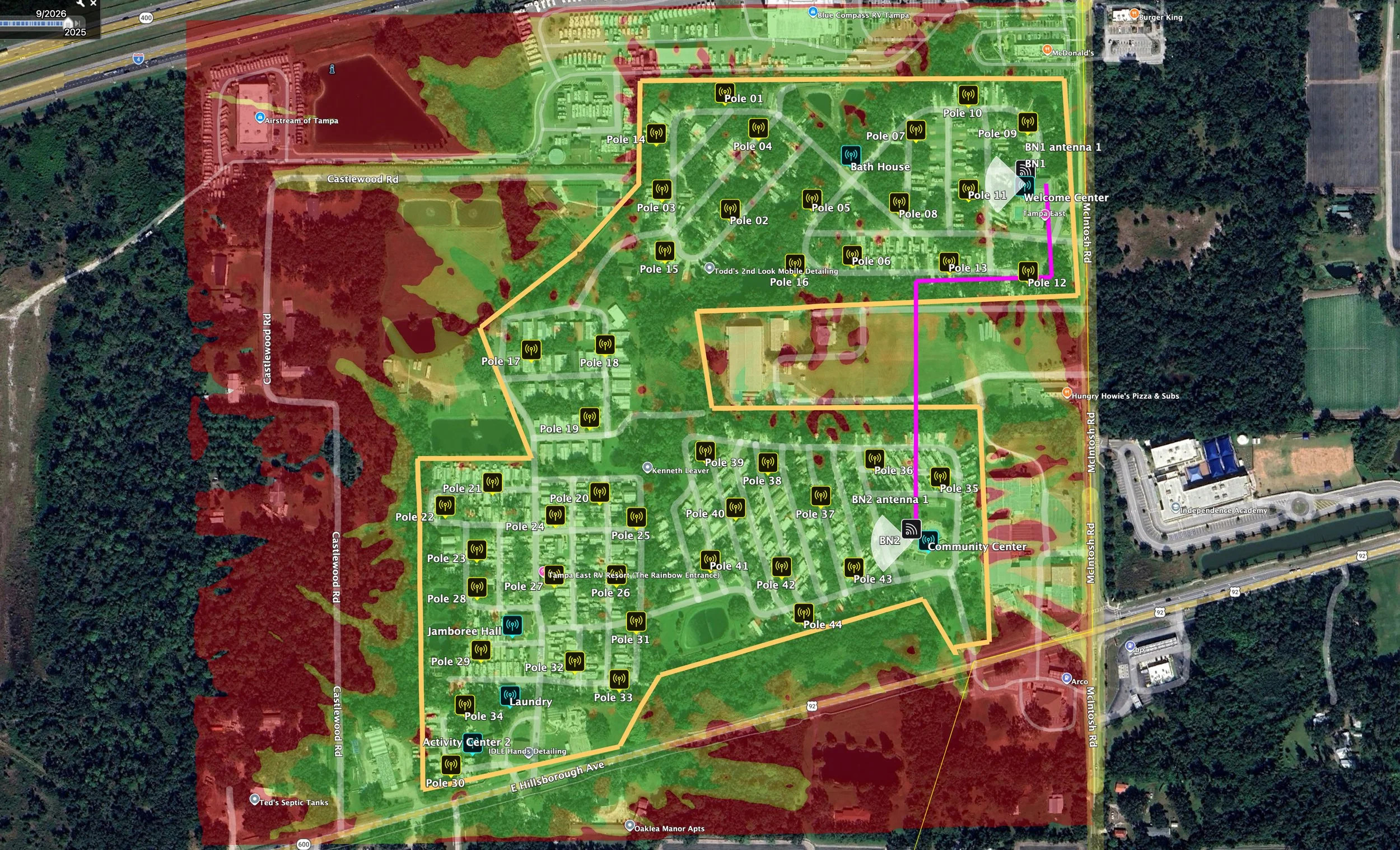
Description This course teaches participants how to produce deployable RF plans for outdoor Wi‑Fi networks and their supporting backhaul using professional propagation modeling and validated design workflows. Learners will gain practical skills in point‑to‑multipoint (PtMP) and point‑to‑point (PtP) backhaul design, capacity and latency estimation, spectrum management, sectorization and antenna selection, and interference mitigation. The course emphasizes hands‑on simulation, report generation, and validation of models against survey or drive‑test data so designs are ready for field deployment.
Target audience
RF engineers and wireless network planners responsible for outdoor Wi‑Fi coverage and capacity.
Field engineers and survey teams who perform RF validation and drive tests.
Project managers overseeing outdoor Wi‑Fi and backhaul deployment projects.
Technical leads tasked with producing RF plans, procurement specifications, or performance acceptance criteria.
Prerequisites
Basic understanding of wireless fundamentals (RF propagation, modulation, link budget).
Familiarity with Wi‑Fi technologies (IEEE 802.11 family) and basic IP networking concepts.
Comfort with spreadsheets; prior exposure to propagation/design tools is beneficial but not required.
Duration and format
Typical delivery: 5 days (classroom).
Format: Lectures, case discussions, and instructor‑led hands‑on labs.
Labs: Practical sessions using professional propagation/design software with curated sample datasets; optional exercises to validate models against provided survey or drive‑test logs.
Course outline
Module 1 — Introduction and workflow overview
Objectives and expected deliverables from an outdoor Wi‑Fi project.
Typical project lifecycle: requirements, site survey, RF design, backhaul design, commissioning, validation, and acceptance.
Roles and responsibilities: planner, surveyor, field engineer, PM, vendor.
Overview of tools and datasets used in design and validation.
Module 2 — Outdoor Wi‑Fi fundamentals and use cases
Propagation characteristics in outdoor environments (LOS, NLOS, clutter, terrain, foliage).
Wi‑Fi frequency bands, channelization, regulatory considerations, and equipment capabilities.
Common outdoor deployment topologies: campus, municipal/WISPs, event/temporary, transit corridors, public venues.
Performance drivers: coverage vs capacity tradeoffs.
Module 3 — Propagation modeling and inputs
Radio propagation models: empirical, deterministic (ray tracing), and hybrid approaches — strengths and limitations.
Required inputs: terrain (DTM/DEM), clutter/land‑use, building data, antenna patterns, heights, and device parameters.
Creating accurate terrain and clutter layers; geocoding and coordinate systems.
Calibration principles: using previous survey data or drive tests to tune models.
Module 4 — Link budget, coverage prediction, and cell planning
Link budget equations, margins, and fade allowances for outdoor Wi‑Fi.
Sensitivity analysis: effect of transmit power, antenna gain, height, and frequency on coverage.
Cell planning techniques: cell size estimation, sectorization strategies, antenna tilt and azimuth planning.
Coverage prediction outputs: heatmaps, cumulative distribution of received power, and coverage statistics.
Module 5 — Capacity planning and traffic modeling
Translating user requirements to capacity: throughput, concurrency, application mix, and QoS needs.
Medium access characteristics of Wi‑Fi and impact on effective throughput.
Dimensioning AP count, channel reuse, and spatial separation for target capacity.
Estimating latency and jitter in access and under load; planning for voice/video service.
Module 6 — Spectrum management and interference mitigation
Frequency planning for outdoor Wi‑Fi: 2.4 GHz limitations, 5 GHz/6 GHz channelization, DFS considerations.
Co‑channel and adjacent‑channel interference assessment and mitigation techniques.
Dynamic channel management, power control, and antenna pattern optimization.
Dealing with legacy and uncooperative devices in public spaces.
Module 7 — Sectorization and antenna selection best practices
When and how to use sectors vs omnidirectional deployments.
Selecting antennas: sector beamwidths, gain, polarization, and mounting considerations.
Mechanical and electrical tilt, null‑fill, and boresight alignment for outdoor APs.
Mounting, grounding, lightning protection, and environmental factors.
Module 8 — Backhaul design: PtMP and PtP workflows
Backhaul role and capacity requirements for outdoor Wi‑Fi networks.
PtP vs PtMP architectures: use cases, advantages, and limitations.
Link budget and availability calculations for microwave/mmWave backhaul; fade margins and reliability targets.
Throughput and latency estimation for backhaul links; selecting modulation, channel width